AICU Image API
Alpha. One key, one endpoint — switch between GPT-Image-2 and Nano Banana 2 (Gemini) with a single parameter.
See what it does before you read the reference
Everything below is the reference. If you would rather see it working first, these three
came out of a single request each, through the curl on this page.
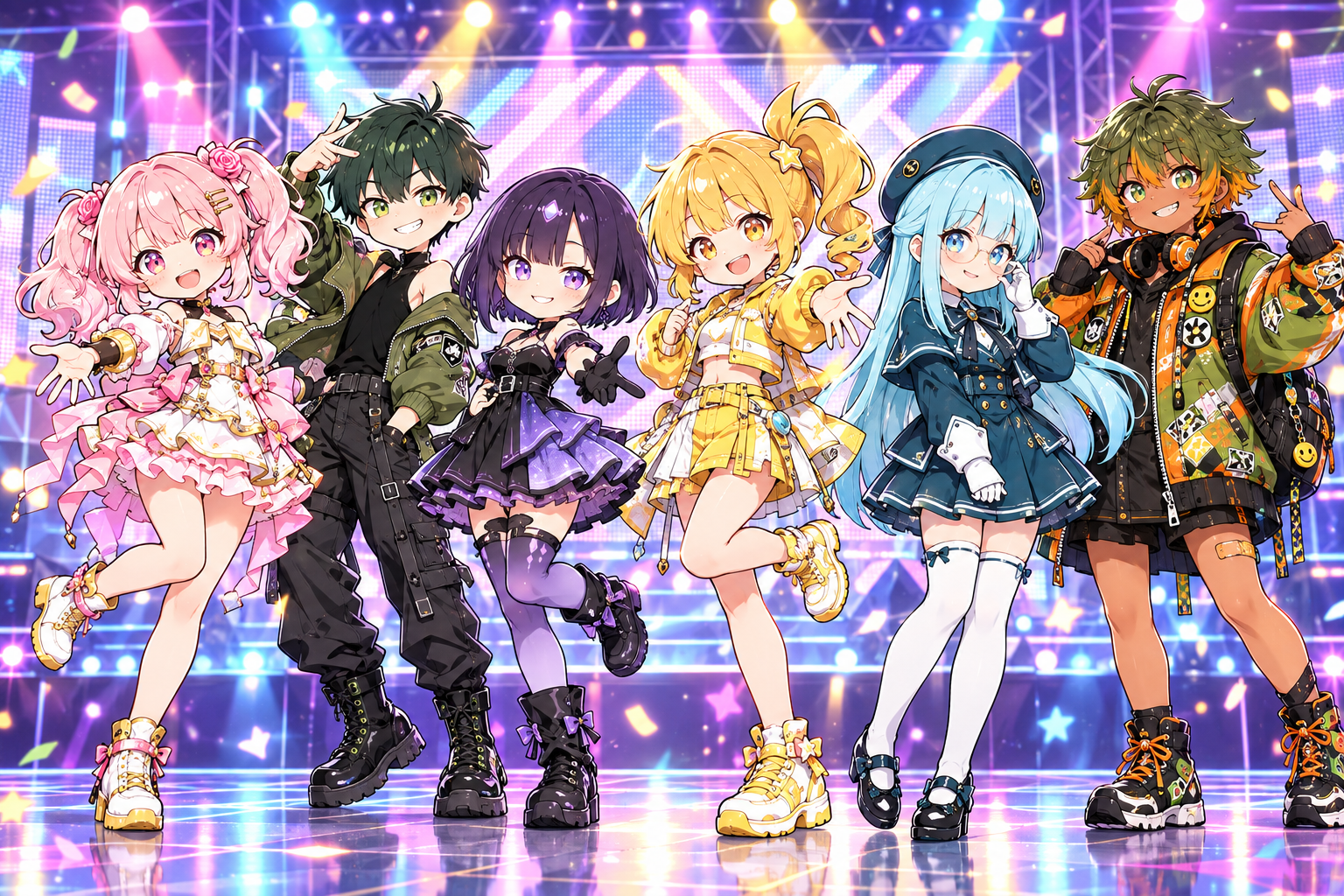
Six named characters in one image, each keeping their own design. The hard part is not drawing six people — it is stopping them from blending into each other.

A four-panel comic in one request. Same character in all four, with the panels laid out by the model rather than composited afterwards.
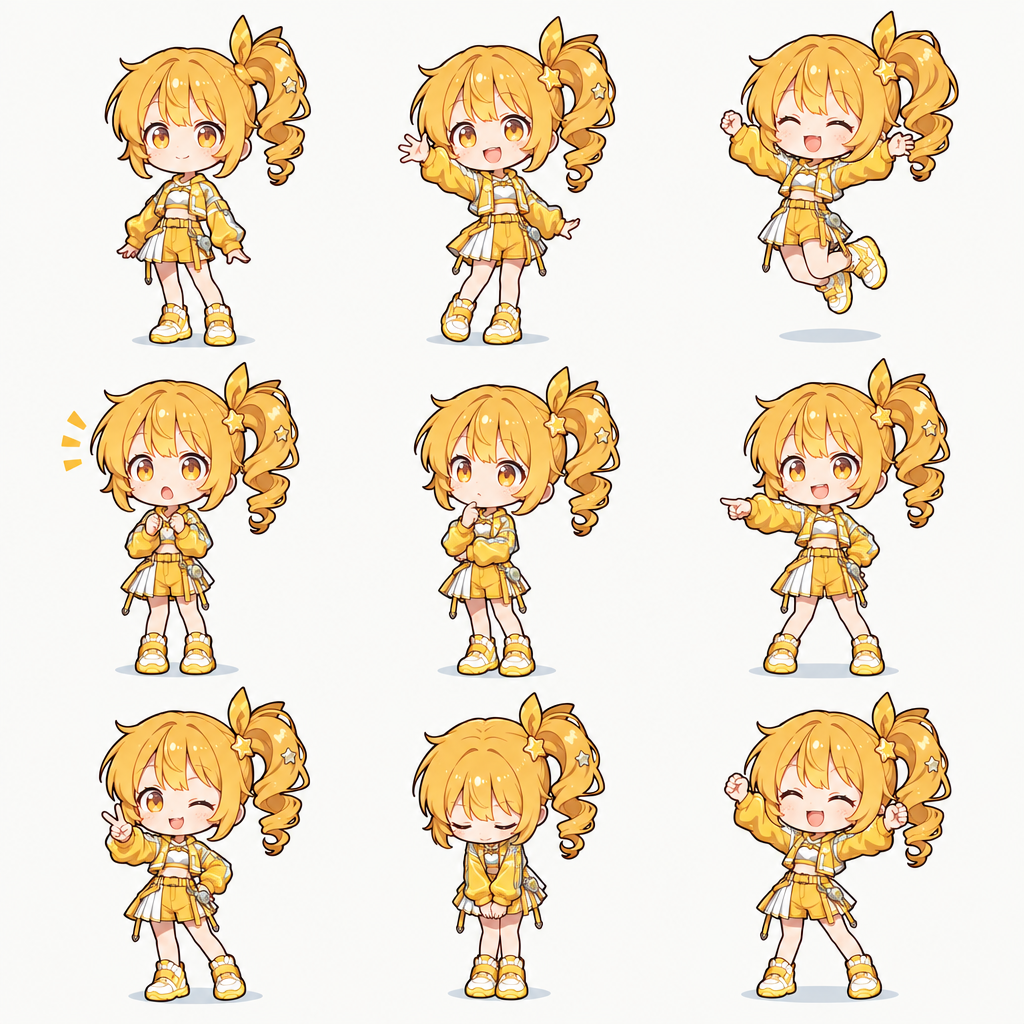
A nine-pose sprite sheet on a flat background, ready to cut up for a game or a VTuber rig.
The walkthroughs
These are written to be read, not looked up — start here if the reference below is heavy going.
| What it shows | |
|---|---|
| GPT-Image-2.5 — the API manual, translated | Every parameter, in Japanese, with what each one actually changes |
| The prompting guide, translated | How to write prompts for this model specifically, plus a batch-generation sample |
| Image generation guide, Part 1 | Choosing an API, multi-turn editing, streaming |
| Trying it on our own characters | The three images above, with the exact prompts that produced them |
| AiCutyBench — does it actually reproduce a character? | Measured hit rate over repeated runs, not a demo cherry-pick |
Base URL
https://api.aicu.ai/v1
Authentication
You need an API key with the images scope. Issue one from the dashboard.
Authorization: Bearer aicu_live_xxx
GET /v1/images/models
The image models available to you (no auth required).
curl https://api.aicu.ai/v1/images/models
| model | Provider | Reference image | Aspect ratio | Notes |
|---|---|---|---|---|
gpt-image-2 | OpenAI | ○ | - | High quality, strong character consistency |
nano-banana | Gemini | ○ | ○ | Fast, supports aspect ratios |
sd3.5-large | Stability | - | - | Stable Diffusion 3.5 Large |
Model names from wherever you are migrating (gemini-3.1-flash-image-preview, for example) are accepted as-is.
POST /v1/images/generations
curl -X POST https://api.aicu.ai/v1/images/generations \
  -H "Authorization: Bearer aicu_live_xxx" \
  -H "Content-Type: application/json" \
  -d '{
    "model": "nano-banana",
    "prompt": "a red apple on a white table, product photo",
    "aspect_ratio": "16:9"
  }'
Request
| Parameter | Type | Description |
|---|---|---|
prompt | string | Required. What to generate |
model | string | Defaults to gpt-image-2 |
aspect_ratio | string | 16:9 and similar (nano-banana only) |
size | string | 1024x1024, 1536x1024, etc. |
quality | string | low / medium / high |
reference_image | string | Reference image as base64 (data URLs accepted) |
character | string | Reference-image preset. Takes precedence over model |
seed | number | For reproducible output (sd3.5-large) |
force | boolean | true bypasses the cache and regenerates |
Response
Comes back in the OpenAI-compatible shape.
{
  "data": [{ "b64_json": "iVBORw0KG..." }],
  "cached": false
}
Regenerating with identical inputs is served from the R2 cache, and cache hits are free (cached: true).
⏱ Generations that take more than 60 seconds are delivered by email
Some generations take longer than 60 seconds — high quality settings (xhigh / max), requests
with a reference image, large sizes, and gpt-image-2 (measured at 113–171 seconds).
These are not meant to be awaited inside an app. Most HTTP clients give up after 30–60 seconds, and Cloudflare's edge cuts the connection at 100 seconds. When that happens it looks like a failure, but the generation finishes on our side and you are billed exactly once. Do not retry because the request timed out — every retry throws away a few thousand AP.
The result of a generation that runs past 60 seconds is delivered by email, with the image
attached, to the key owner (and to notify_email if you set it). Decline with
"notify_on_timeout": false — but then you have one fewer way to receive the result.
Other ways to get the image back:
GET /v1/images/status/{id}— theidfrom the response body, or theX-AICU-Image-Idheader (sent as soon as the connection opens when streaming). Use this one. It fetches exactly the generation you asked forGET /v1/images/recent— lists your recent generations with their ids. ⚠️ With concurrent generations on the same key this returns someone else's image; preferstatus/{id}- The usage history in the dashboard
If you are building an app that shows the image right away:
- Use
qualitylow/medium/highat1024x1024.GET /v1/images/modelsreportstypical_latency_s_by_quality, so you can check the expected time before you call - Pass
"stream": true— partial images keep flowing over SSE, so the connection never goes idle (not compatible withcharacter/reference_image/mask; plain generation only) - Pass
"notify_email"(plus"app_name") to notify your own end user directly when the image is ready - If you really want it synchronously, raise your client timeout to 240 seconds or more
(
--max-time 240for curl,timeout=240for requests)
Video generation is asynchronous from the start: POST /v1/video/generate returns 202 with an
id, and you poll GET /v1/video/status/{id}.
Keeping a character consistent with reference images
Option 1: registered character presets (character) — the official AiCuty characters are already registered, so you get a consistent look without preparing any reference image.
# List them (no auth): returns slug, model, rate and rights notices
curl https://api.aicu.ai/v1/images/characters

# Use one: just pass the slug in character (case-insensitive)
curl -X POST https://api.aicu.ai/v1/images/generations \
  -H "Authorization: Bearer aicu_live_xxx" \
  -H "Content-Type: application/json" \
  -d '{"character": "SakiNoir", "prompt": "カフェで読書している、午後の光"}'
Registered presets (reference images included, gpt-image-2): SakiNoir / NaoVerde / MeiSoleil / ElenaBloom / MinaAzure / elec_sheep and more. The rights field in the listing API carries the credit line and the rights holder — follow it when you publish.
Option 2: your own reference image (reference_image) — nothing has to be uploaded to R2 beforehand. Just send the image you have as base64.
import base64, requests

ref = base64.b64encode(open("character.png", "rb").read()).decode()
res = requests.post(
    "https://api.aicu.ai/v1/images/generations",
    headers={"Authorization": "Bearer aicu_live_xxx"},
    json={
        "model": "nano-banana",
        "prompt": "Using the reference image as a character guide, draw the same character waving hello",
        "reference_image": ref,
        "aspect_ratio": "16:9",
    },
    timeout=180,
)
open("out.png", "wb").write(base64.b64decode(res.json()["data"][0]["b64_json"]))
Migration guide: swapping out OpenAI / Gemini
Migrating from Gemini (google-genai)
- client = genai.Client(api_key=GEMINI_API_KEY)
- response = client.models.generate_content(
-     model="gemini-3.1-flash-image-preview",
-     contents=prompt,
-     config=types.GenerateContentConfig(
-         response_modalities=["IMAGE", "TEXT"],
-         image_config=types.ImageConfig(aspect_ratio="16:9"),
-     ),
- )
+ res = requests.post(
+     "https://api.aicu.ai/v1/images/generations",
+     headers={"Authorization": f"Bearer {AICU_API_KEY}"},
+     json={"model": "nano-banana", "prompt": prompt, "aspect_ratio": "16:9"},
+ )
Migrating from the OpenAI SDK
- client = OpenAI(api_key=OPENAI_API_KEY)
- res = client.images.generate(model="gpt-image-2", prompt=prompt, size="1024x1024")
+ res = requests.post(
+     "https://api.aicu.ai/v1/images/generations",
+     headers={"Authorization": f"Bearer {AICU_API_KEY}"},
+     json={"model": "gpt-image-2", "prompt": prompt, "size": "1024x1024"},
+ )
Once you switch, there are no more per-provider keys to manage, and usage and cost land in a single dashboard.
Errors
| Status | Meaning |
|---|---|
| 401 | Invalid API key |
| 403 | Key does not have the images scope |
| 402 | Insufficient credits |
| 404 | Unknown model |
| 503 | Provider key not configured / generation failed |
Checking usage
curl https://api.aicu.ai/v1/usage -H "Authorization: Bearer aicu_live_xxx"
The dashboard's usage history can be filtered down to images.
Support
- Dashboard: https://api.aicu.ai/dashboard
- Contact: https://aicu.ai/contact
© 2026 AICU Inc.