Key visuals with Wan 3.0 (1) — 10 teasers from one trophy photo, using the official prompt guide

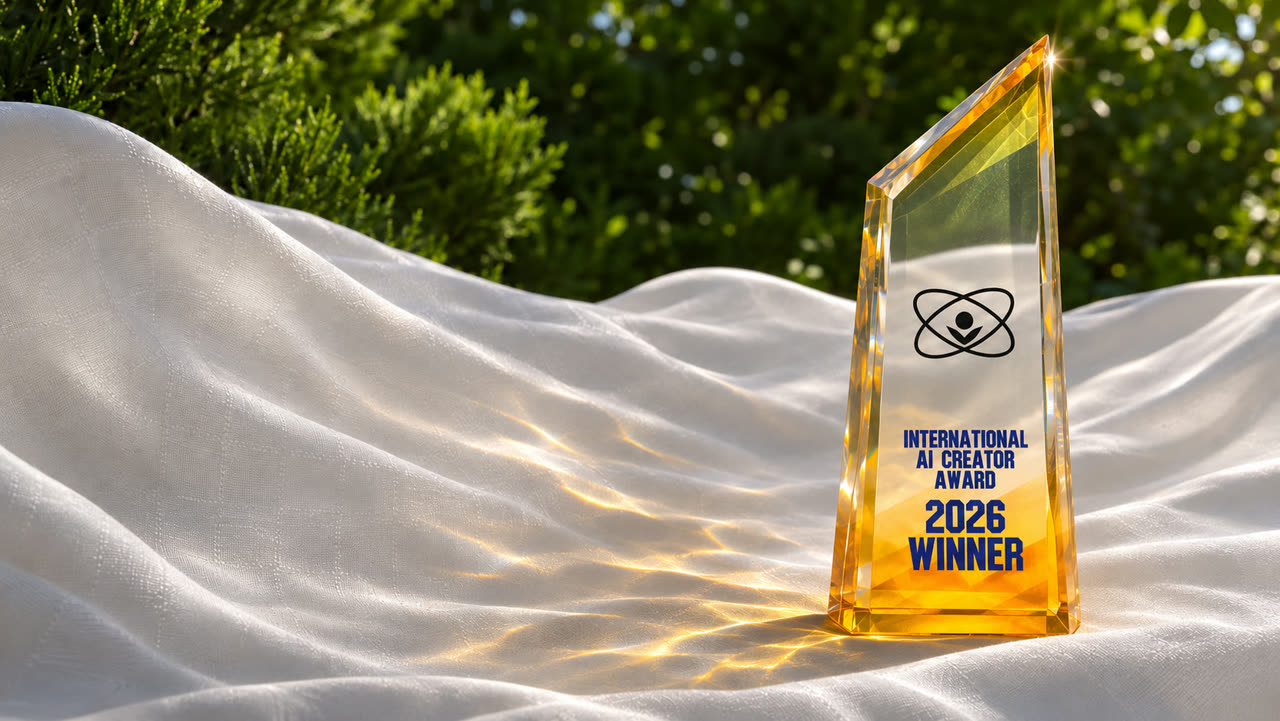
We have one photo of the International AI Creator Award 2026 trophy. Suppose someone asks you to turn it into "a teaser video that evokes shimmering radiance, wind, influence, intelligence, history, authority, creativity, and contribution to the community." What do you write?
We passed this photo as the first frame to AICU API's video generation (wan3.0-video) and tried 10 prompts written the way Alibaba Cloud's official prompt guide recommends. Below are all the videos, all the prompts, and the time and AP each one took.
Setup
| Model | wan3.0-video (Alibaba Cloud's Wan 3.0) |
| Input | The trophy photo above (1671×941), passed as first_frame |
| Resolution / length | 720p, 5 seconds (10 seconds for #10 only) |
| Cost | 720p is 1,400 AP per second. 7,000 AP for 5 seconds, 77,000 AP for all 10 (#10 is 10 seconds, 14,000 AP) |
| Time taken | 111–204 seconds per video (from submitting to receiving the mp4) |
| Failures | 0 |
The call follows Video API. To pass a first frame, write it like this:
curl -X POST https://api.aicu.ai/v1/video/generate \
  -H "Authorization: Bearer $AICU_API_KEY" \
  -H "Content-Type: application/json" \
  -d "{
    \"model\": \"wan3.0-video\",
    \"first_frame\": \"$(base64 -i trophy.jpg)\",
    \"prompt\": \"Sunlight shimmers across the facets of the crystal trophy ...\",
    \"resolution\": \"720p\",
    \"seconds\": 5
  }"
You can also download a script that submits all 10 at once. It uses only the standard library, runs up to 3 jobs at a time, and does not resubmit videos that are already done. By default it only estimates the cost: wan-teaser-10.py
curl -O https://api.aicu.ai/docs/samples/wan-teaser/wan-teaser-10.py
python3 wan-teaser-10.py --image trophy.jpg --out out/            # estimate only
python3 wan-teaser-10.py --image trophy.jpg --out out/ --apply    # generate
The official guide's "formulas"
Alibaba Cloud Model Studio's Text-to-video / image-to-video prompt guide recommends writing prompts as a sum of parts. We used these four:
| Formula | What goes in |
|---|---|
| Image to video | Motion + camera movement. The image already decides the subject, scene and style, so don't write them in the prompt |
| Aesthetic control | Add light source, quality of light (backlight, rim light, side light), time of day, shot size, angle, lens, and color tone |
| Sound | Subject + scene + motion + a description of the sound (voice, sound effects, music). To suppress speech, add No dialogue. |
| Multi-shot | An overall description + shot numbers and times, such as Shot 1 [0-3 s]: ... |
The guide also lists things to avoid: rendering on-screen text exactly, abrupt scene changes within one video, and names of real people, among others. The trophy has text on it, so whether the text stays intact became one of the things to watch.
The 10 results
Each pattern's strip shows one frame per second, left to right.
01 The request as written
This is the baseline. Only abstract words, with no motion and no camera.
A teaser video that evokes shimmering radiance, wind, influence, intelligence, history,
authority, creativity, and contribution to the community.

The model cut the shots on its own. Wide → close → wide: the shot changes three times in 5 seconds, and the trophy's angle shifts slightly with each shot. It actually feels the most like a "teaser" of all, but since we didn't say what should happen, you won't get the same thing next time.
02 The basic formula (motion + camera)
This is the guide's "image to video" formula as is. Two motions and one camera move.
Sunlight shimmers across the facets of the crystal trophy, and the white cloth ripples gently
in the breeze. The camera slowly pushes in.

Just as written, the camera slowly pushes in. The text grows larger as it does, but "2026 WINNER" stays readable to the end. This form looks like a good place to start.
03 Shimmering radiance
Add lighting words (backlight, rim light, warm tones) and hold the camera still (Fixed camera).
Golden caustic light dances and ripples across the white cloth around the trophy, and a soft
lens flare pulses at its tip. Backlight, rim light, warm tones. Fixed camera.

The most stable of the 10. The trophy doesn't move; only the light patterns (caustics) on the cloth ripple, and a flare lights up at the tip. It suits loop footage or background video for a booth.
04 Wind
A gust of wind sweeps across the scene: the white cloth billows in slow waves, the leaves behind
sway, and dappled light flickers over the crystal. The camera moves slowly to the left.

The cloth billows widely and the camera drifts to the left. Despite the large motion, the trophy's shape and text were preserved. This was the only one that took 196 seconds to generate.
05 Authority (low angle)
"Authority" is expressed through angle (low angle), camera movement (pushing in while tilting up), and light (side light, high contrast).
The trophy stands still and solemn as the light grows stronger along its edges. Low-angle shot,
the camera slowly pushes in and tilts up toward the glowing tip. Side light, high contrast.

In the last 2 seconds it pushes in sharply and ends looking up at the tip. Ending on a strong burst of light works well as the close of a teaser. Once fully pushed in, the text leaves the frame.
06 History (time-lapse)
"Time-lapse," from the guide's style vocabulary, expresses the passage of time.
Time-lapse photography: the shadow of the trophy sweeps slowly across the white cloth as the
light shifts from bright morning white to deep sunset gold. Fixed camera.

The light changes from white to sunset gold, and the shadow stretches out. However, the shape of the shadow doesn't match the trophy (a band-like shadow appears on the cloth). Mood takes priority over physical accuracy, so take care if the shadow is the star of the shot.
07 Intelligence (circuits of light)
"Intelligence" is shown as lines of light running through the crystal. The camera orbits slightly. The guide recommends keeping an orbit under 45 degrees, so we wrote under 30 degrees.
Inside the crystal, fine lines of light trace and branch like a network, rising slowly from the
base to the tip, while refracted light glints across its facets. Orbiting camera movement, a slow
arc of less than 30 degrees.

The one that came out most "as written." Lines of light branching from the base fill the trophy from bottom to top. On the other hand, the lines also cross over the text, so it isn't suited to shots where the text needs to be read.
08 Community (spreading light)
"Influence" and "contribution to the community" are expressed as light spreading outward from the trophy. At the end the camera pulls back to show the whole scene.
Small sparks of golden light spread outward from the base of the trophy across the cloth like
ripples, multiplying as they travel toward the edges of the frame. The camera slowly pulls out
to reveal the whole scene.

Rings of light spread concentrically over the cloth, and the camera pulls far back. Visually it is the easiest to read, tied with 07. As the camera pulls back and the trophy gets smaller, the text blurs and becomes unreadable.
09 The sound formula (sound effects + music)
Using the guide's sound formula, we specified sound effects (wind, a crystal chime) and music (an orchestra with strings and brass), and suppressed speech with No dialogue.
The white cloth ripples in the wind and light shimmers across the crystal trophy. Sound: wind
rustling through the leaves, a clear crystal chime as a flare passes the tip, and a slow, rising
orchestral score with strings and soft brass. No dialogue.

The picture has calm motion similar to 02–04. One thing we learned about sound: 01–08, where we didn't specify any sound, have audio too. Wan 3.0 generates sound even if you write nothing. If you plan to add narration or music later for a screening, either assume you will replace the generated audio, or spell out the sound you want here.
10 Multi-shot (10 seconds)
Using the guide's multi-shot formula, we wrote three shots with timestamps.
A teaser for an international award, in three shots. Shot 1 [0-3 s]: close-up, light glides
along the crystal edge of the trophy, fixed camera. Shot 2 [3-6 s]: medium shot, the white cloth
ripples in the wind and golden caustics dance around the base, the camera moves left. Shot 3
[6-10 s]: the camera pulls out and rises to reveal the trophy standing in sunlight against the
green trees, and a lens flare blooms at its tip. Sound: soft wind, a crystal chime, an orchestral
swell. No dialogue.

It splits into three shots: the second pushes in on the light patterns around the base, and the last pulls back and ends on a flare. The structure is almost exactly as specified. However, Shot 1 started not with a close-up but with a wide shot close to the original photo. Because the first frame is fixed to the photo, the first shot inevitably starts from that composition. If you want to start with a close-up, the reliable way is to make a separate close-up image and pass it as first_frame. Generation took 204 seconds and cost 14,000 AP.
What we learned
| Result | |
|---|---|
| Abstract words only (01) | The model cuts shots on its own. You get a mood, but not what you aimed for |
| Motion + camera (02–05) | It follows the camera movement you write well. Push-in, drift left, tilt up all came out |
| Fixed camera + lighting vocabulary (03) | The most stable. Good for loops and background video |
| Turning metaphors into images (07, 08) | "Circuits of light" and "spreading light" come out as written. In exchange, the text gets hidden or blurred |
| Expressing time (06) | The light color changes, but the shadow's shape isn't accurate |
| Sound | Every video gets audio even if you don't specify it. Write the sound you want; if you don't want it, replace it later |
| Multi-shot (10) | It follows the structure. The first shot is pulled toward the composition of first_frame |
For a subject with text on it, the safe choices were not moving the camera much (03) or pushing in to show the text (02). Shots that pull back or layer light effects (07, 08) come together as a teaser when you edit them alongside shots where the text is readable.
One caution about sound. When we ran the audio through our own speech recognition, it detected what sounded like short English words in 04 and 08. Speech recognition sometimes invents words on top of music, so we can't tell whether there is really speech. Always check by ear before using these in a screening.
Cost summary
| 5 seconds × 9 | 7,000 AP × 9 = 63,000 AP |
| 10 seconds × 1 | 14,000 AP |
| Total | 77,000 AP (about $7.70) |
Failed generations are not charged (AP is held when a job starts and fully refunded if it fails). This time all 10 succeeded on the first try.
⭐︎ Prices are as of publication (November 12, 2026). You can check current rates on Pricing and with GET /v1/models.
Related
- Key visuals with Wan 3.0 (2) — Loop footage and a logo transition with FLF2V
- Key visuals with Wan 3.0 (3) — From white to logo, photo, loop and back to white: chaining FLF2V into one video
- Video API — How to call it, first and last frames, and specifying characters
- Alibaba Cloud: Text-to-video / image-to-video prompt guide — Source of the formulas used here
Special Thanks to Alibaba Wan 3.0